


-20733.png)
What Goes on an APA Reference Page?
The APA reference page is one of the most important parts of any paper formatted in APA, one of the most widely used citation styles in academic writing. But before the formatting rules, let's be clear about what actually belongs on it.
Only sources you actually cited in your paper go here. Every source you mentioned using APA in-text citations must appear on this page, and everything on this page must have a matching in-text citation somewhere in your body text. If you read something but didn't cite it, leave it off.
In APA style, the reference page lists only the sources you cited in text, not everything you read.
A few other things to know about placement and labeling:
|
APA Reference Page Formatting Rules
Getting the formatting right comes down to six main rules. These apply to the entire page, not just individual entries.
- Label: Type "References" at the top of the page, bold and centered. No special font, no decorative styling.
- Double-spacing: Yes, APA references are double-spaced. The full reference page is double-spaced, including between entries. You don't add an extra blank line between sources. This is the most commonly searched question from this section, so to be direct: are references double spaced in APA? Yes, always, with no extra breaks.
- Font: Use the same font as the rest of your paper. For most student papers, that's Times New Roman 12pt or Arial 11pt.
- Margins: One inch on all sides, consistent with the rest of the paper.
- Page numbers: Continue your paper's page numbering into the reference page. The number goes in the top right corner.
- Hanging indent: Every reference entry uses a 0.5-inch hanging indent. That means the first line of each entry sits flush with the left margin, and any additional lines are indented 0.5 inches. This is the formatting element students get wrong most often, and it's very visible when it's missing.
| For the full structure of your paper, including how the reference page fits within everything else, see our guide on APA research paper format. |
How to Set Up Your Reference Page in Word (Step by Step)
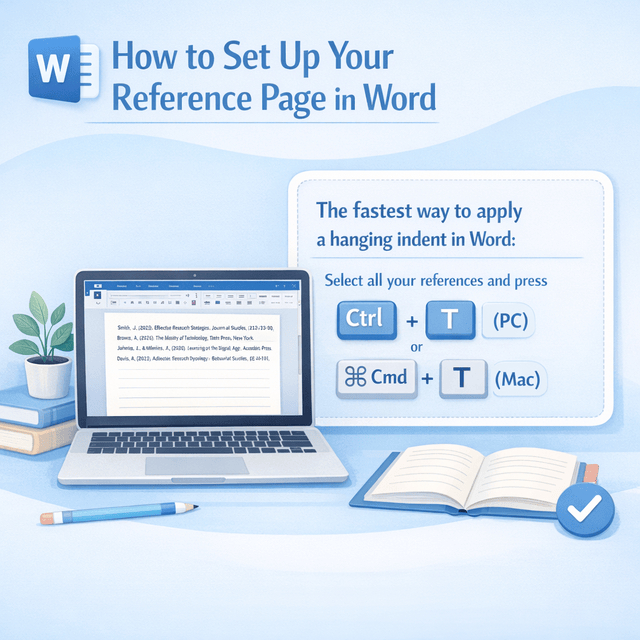
This is where most guides fail students. Knowing the rules is one thing. Actually getting Word to do what you want is another. Here's the step-by-step.
Step 1:
At the end of your paper's final page, insert a page break (Ctrl + Enter on PC, Cmd + Enter on Mac). This puts the reference page on its own page.
Step 2:
Type "References" and center it using the alignment tool or Ctrl + E. Then bold it with Ctrl + B.
Step 3:
Press Enter, then turn off bold and switch back to left alignment. You're now ready to type your entries.
Step 4:
Type or paste all your reference entries, one after the other, no blank lines between them.
Step 5:
Select all your reference entries (not the "References" heading). Then apply the hanging indent. In Word: go to Format > Paragraph > Indentation > Special > Hanging, and set it to 0.5 inches. The fastest shortcut: with your entries selected, press Ctrl + T (PC) or Cmd + T (Mac).
Step 6:
With your entries still selected, set line spacing to double. Go to the Home tab > Line Spacing > 2.0.
For Google Docs: The steps are nearly identical. For the hanging indent, go to Format > Align & Indent > Indentation options > Special indent > Hanging > 0.5 inches.
Let Us Handle the Whole Paper
Our writers format every section correctly, including your reference page.
100% original, plagiarism-free content
Alphabetical Order Rules for APA References
APA references are alphabetized by the first author's last name. That's the basic rule. But there are several edge cases that come up often enough to be worth knowing before you finalize your list.
- Same surname, different authors: If two authors share a last name, alphabetize by their first initial. Smith, A. comes before Smith, J.
- Multiple works by the same author: List them in chronological order, earliest publication first. If two works have the same year, add a lowercase letter after the year: (2022a), (2022b), and alphabetize by title.
- No author: Move the title to the first position and alphabetize by the first meaningful word. Ignore "The," "A," and "An" at the start of a title.
- Numbers in titles: Alphabetize as if the number were spelled out. A title beginning with "10" would alphabetize as if it started with "ten."
- Organization as author: Use the full organization name and alphabetize by the first word of that name.
Here's a quick reference for the most common edge cases:
Situation | Rule |
Two authors with the same last name | Alphabetize by first initial |
Same author, multiple works | Chronological order (earliest first) |
No author | Alphabetize by the first meaningful word of the title |
Organization as author | Alphabetize by organization name |
Number at start of title | Alphabetize as if spelled out |
When a source has no author, move the title to the first position and alphabetize by the first meaningful word.
APA Reference Page Examples by Source Type
Seeing correctly formatted entries side by side is the fastest way to check your own work. Here are examples for the three source types you'll use most.
Book
Format: Author, A. A. (Year). Title of book: Subtitle if any. Publisher. Example: Brown, C. (2019). The anatomy of academic writing: A student guide. Academic Press. Note: Italicize the book title. Use sentence case for the title, meaning only the first word, proper nouns, and the first word after a colon are capitalized. |
Journal Article (with DOI)
Format: Author, A. A., & Author, B. B. (Year). Title of article. Journal Name, volume(issue), page range. https://doi.org/xxxxx Example: Zhang, L., & Patel, R. S. (2021). Reading comprehension strategies in first-generation college students. Journal of Educational Psychology, 113(4), 812 to 829. https://doi.org/10.1037/edu0000612 Note: Italicize the journal name and volume number. APA 7 requires a DOI for journal articles when one is available, even if you accessed the print version. If there's no DOI, use the journal's stable URL. |
Website
Format: Author, A. A. (Year, Month Day). Title of page. Site Name. URL Example: National Institutes of Health. (2023, August 14). Understanding clinical trials. U.S. Department of Health and Human Services. https://www.nih.gov/health-information/nih-clinical-research-trials-you/understanding-clinical-trials Note: If no date is available, use (n.d.) in place of the year. Include a retrieval date only for pages that change frequently (like wikis): "Retrieved March 10, 2026, from [URL]." Once you have your sources formatted, the rest of your paper structure follows the same careful approach. Your APA abstract appears at the start of your paper; the reference page closes it out. Both follow their own distinct formatting rules within our APA format guide. APA 7 requires a DOI for journal articles when one is available, even if you accessed the print version. |
Common APA Reference Page Mistakes (and How to Fix Them)
Most formatting errors on the reference page come down to the same handful of mistakes. Here's what to look for and how to correct it.
Mistake 1: Using "Works Cited" or "Bibliography" instead of "References."
Works Cited is an MLA term. See our APA vs MLA guide for the full comparison. In APA, the heading is always "References," no exceptions.
Mistake 2: Missing or incorrect hanging indent
This is the most visible formatting error. If all your lines are flush left, the indent isn't applied. Select all your entries and use Ctrl + T (Word) or the Format > Indentation menu (Google Docs) to apply a 0.5-inch hanging indent.
Mistake 3: Single-spacing or adding blank lines between entries
The entire reference page should be double-spaced, including the space between entries. Don't add extra blank lines. Select everything and set line spacing to 2.0.
Mistake 4: Alphabetizing by first name instead of last name
This one's easy to miss if you're working quickly. Check each entry: the author's last name should come first. Smith, J., not John Smith.
Mistake 5: Missing DOI or using the wrong format
The correct format starts with the full URL: https://doi.org/ followed by the code. Never use "doi:" or the code alone. If you can't find the DOI, look it up on the article's journal page or via CrossRef.
Mistake 6: Including sources you read but didn't cite
The reference page is not a reading list. It contains only the sources with matching in-text citations in your paper. If you want to include additional sources, that's a bibliography, which APA doesn't use in standard student papers.
One of the most common APA reference page mistakes is a missing or incorrectly formatted DOI. Always start with https://doi.org/ followed by the code.
Conclusion
Get the six rules locked in: "References" heading, hanging indent, double-spacing, alphabetical order, page number, and matching in-text citations, and you won't lose a single point on formatting. The step by step setup in Word or Google Docs takes five minutes once you know the sequence.
If you hit an edge case (no author, no date, an organization as author), the alphabetical order rules above have you covered. And if your DOI is missing or formatted wrong, fix it before you submit; it's one of the most common reasons students lose easy marks on an otherwise solid paper.
Your reference page doesn't have to be the stressful part. Now you know exactly what goes where. If you are still confused, our expert writers are ready to help you.
Skip the Formatting Stress
Get a complete, correctly formatted APA paper written by a real expert.
- Every citation formatted to APA 7th edition standards
- Reference page, in-text citations, title page, all included
- 100% original, plagiarism-free content
- Timely delivery to meet your deadlines
Get expert assistance today and make your APA paper stand out effortlessly.
Get APA Research Paper Help






-20697.png)
-20709.png)
-20713.png)
-20717.png)
-20734.png)