What is Programming Logic?
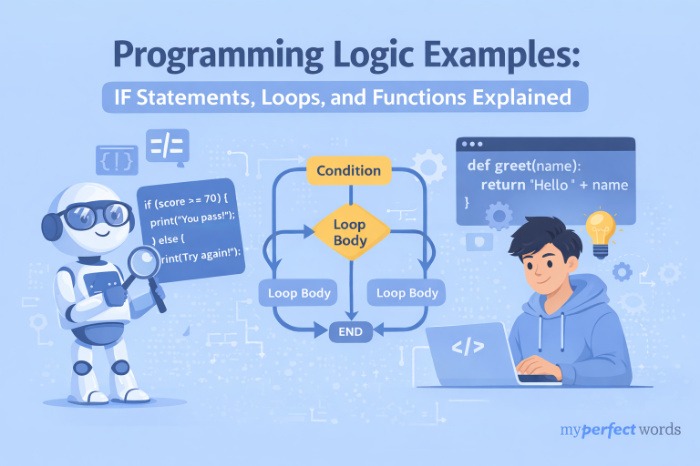
Programming logic is the set of reasoning patterns that control how your code makes decisions, repeats actions, and organizes itself into reusable pieces.
Here's a useful way to think about it. Syntax is the vocabulary: the spelling, grammar, and punctuation of a language. Logic is the sentence structure. You can know every word in French and still not be able to hold a conversation if you don't know how to put them together.
Most beginners get tripped up because tutorials focus almost entirely on syntax. They teach you what to type. Logic is about why you type it and when to use which tool.
Three patterns cover the vast majority of what logic does in everyday code:
- Conditions: making decisions based on whether something is true or false
- Loops: repeating a block of code until a condition changes
- Functions: packaging reusable logic so you don't repeat yourself
Think of writing a recipe. You follow steps in sequence (structure), you check whether you have certain ingredients before adding them (conditions), you repeat a mixing action a set number of times (loops), and you might have a "prepare the sauce" sub-routine you call at different points in the recipe (functions).
"Syntax tells the computer what words to use. Logic tells it what to do."
Conditional Logic Examples (IF Statements)
What Are Conditions?
A condition is a yes/no question your program asks while it's running. Based on the answer, it takes one path or another.
Think of a traffic light. If the light is red, you stop. If it's green, you go. The light doesn't think. It just checks a condition and responds accordingly. That's exactly what an IF statement does.
Basic IF Statement
age = 20
if age >= 18:
print("You can vote.") # Only runs if age is 18 or above
Walk through what's happening here: Python checks whether the value stored in age is greater than or equal to 18. If that's true, it prints the message. If it's false, nothing happens at all.
IF-ELSE Statement
What if you want something to happen either way? That's what ELSE is for.
temperature = 35
if temperature > 30:
print("It's hot. Stay hydrated.") # Runs when temp is above 30
else:
print("Comfortable weather today.") # Runs for everything else
ELSE is the fallback. It catches every case the IF didn't handle. You use it when you want a response no matter which way the condition goes.
ELIF (Multiple Conditions)
Sometimes you need to check more than two possibilities. ELIF (short for "else if") lets you chain conditions together.
score = 75
if score >= 90:
print("Grade: A")
elif score >= 80:
print("Grade: B")
elif score >= 70:
print("Grade: C") # This one runs (75 meets the condition)
else:
print("Grade: D or below")
Python checks each condition in order and runs the first one that's true. Once a match is found, the rest get skipped. That "first match wins" behavior is important. Your order matters.
Nested Conditions
You can put an IF statement inside another IF statement, but be careful with this one.
if age >= 18:
if has_id:
print("Access granted.")
Nesting works, but more than two levels deep and your code gets hard to read fast. If you catch yourself nesting three or four conditions, it's usually a sign to refactor into a function instead.
"Every time your program makes a decision, there's an IF statement running the show."
Loop Logic Examples (Repetition)
What Are Loops?
A loop tells your code: do this task again and again until I say stop.
Think of a photocopier. You tell it you want 20 copies. You don't press the button 20 times yourself. You give it a number, and it repeats the same action. Loops work the same way: you define the repetition, and Python handles the rest.
FOR Loop (When You Know How Many Times)
Use a FOR loop when you're working through a collection of items or you already know how many repetitions you need.
fruits = ["apple", "banana", "cherry"]
for fruit in fruits:
print(f"I have a {fruit}") # Runs once for each item in the list
Python steps through the list one item at a time, assigns each one to the variable fruit, and runs your code block. When the list runs out, the loop ends.
WHILE Loop (When You Don't Know How Many Times)
Use a WHILE loop when you're waiting for something to change, and you don't know in advance how many repetitions that will take.
attempts = 0
while attempts < 3:
print(f"Attempt {attempts + 1}") # Runs as long as attempts stays below 3
attempts += 1 # Increments counter each time
The loop keeps going as long as the condition is true. As soon as attempts reaches 3, the condition becomes false and the loop exits.
Loop Control: Break and Continue
Two keywords give you more control inside a loop.
for number in range(10):
if number == 5:
break # Exits the entire loop immediately
print(number) # Prints 0, 1, 2, 3, 4 (stops before 5)
break exits the loop early when you've found what you were looking for. continue is different. It skips the rest of the current iteration and jumps to the next one, without ending the loop.
Common Loop Mistake: Infinite Loops
If you write a WHILE loop and forget to update the condition variable, it runs forever.
# This loop never ends (attempts never changes!)
attempts = 0
while attempts < 3:
print("Still waiting...")
# Missing: attempts += 1
If your program freezes and you see output scrolling endlessly, an infinite loop is usually the culprit. The fix is always the same: make sure something inside the loop actually changes the condition you're checking.
"Choose FOR when you're counting, WHILE when you're waiting."
Stuck on a Programming Assignment Right Now?
Our expert writers handle any programming task. No AI, no shortcuts.
Your assignment handled. Your deadline met. Stress goes down.
Function Logic Examples (Reusable Code)
What Are Functions?
A function is a named block of code you can call whenever you need it, instead of writing the same code over and over.
Think of a coffee machine. You press one button and the same process runs every time: grind the beans, heat the water, brew the coffee. You don't care what's happening inside. Just press the button. Functions work the same way: you call them by name, they run their code, and you get the result.
Defining and Calling a Function
def greet(name):
print(f"Hello, {name}!") # Runs whatever name you pass in
greet("Alex") # Output: Hello, Alex!
greet("Taylor") # Output: Hello, Taylor!
def tells Python you're creating a function. The name in parentheses (name) is a parameter: it's a placeholder for whatever you'll pass in when you call the function. You can call the same function multiple times with different inputs.
Functions That Return Values
Not all functions print things. Sometimes you want a function to calculate something and hand the result back to you.
def add_numbers(a, b):
return a + b # Sends the result back to wherever the function was called
result = add_numbers(5, 3)
print(result) # Output: 8
The difference between printing inside a function and using return matters a lot. When you return a value, you can store it, use it in another calculation, or pass it to another function. A print statement just displays something. The value disappears after that.
When to Create a Function
A practical rule: if you find yourself writing the same block of code more than twice, turn it into a function.
Functions make your code shorter and easier to fix. When you need to change something, you change it in one place instead of hunting through your entire program for every copy.
Want a deeper look at Python's syntax and structure? Our python programming basics guide covers variables, data types, and all the building blocks in detail.
Logic Building Patterns
Syntax gets you words. Logic patterns get you sentences. Once you recognize these three structures, you'll spot them in almost every program you read or write.
Pattern 1: Input, Process, Output
This is the most fundamental structure in programming. You take something in, do something to it, and hand back a result.
def calculate_tip(bill, percentage):
tip = bill * (percentage / 100) # Process: the calculation
return tip # Output: the result
print(calculate_tip(50, 20)) # Input: a bill of $50, 20% tip
# Output: 10.0
Every meaningful program does this at some level. The inputs might come from a user, a file, or another function. The output might go to the screen, a database, or another calculation.
Pattern 2: Filter and Process
Loop through a collection, check a condition on each item, and do something only with the ones that match.
grades = [85, 92, 60, 78, 95, 55]
passing = []
for grade in grades:
if grade >= 70: # Filter: only keep grades 70 and above
passing.append(grade) # Process: add to the passing list
print(passing) # Output: [85, 92, 78, 95]
You'll use this pattern constantly: filtering a list of orders, finding users who match a condition, pulling records that meet a threshold.
Pattern 3: Accumulator
Keep a running total or collection as you work through a loop.
total = 0
numbers = [10, 20, 30, 40]
for num in numbers:
total += num # Add each number to the running total
print(f"Total: {total}") # Output: Total: 100
The accumulator starts at zero (or an empty list), and you add to it with each iteration. This shows up in every situation where you're summing values, counting occurrences, or building up a result piece by piece.
Most beginner tutorials teach syntax. These patterns teach thinking: recognizing which structure fits the problem in front of you.
5 Common Logic Mistakes
Knowing the patterns is one thing. Knowing where beginners go wrong is just as useful. Here are the mistakes that show up most often, and how to fix them.
Off-by-one errors. range(5) gives you 0, 1, 2, 3, 4, not 1 through 5. If you're expecting 5 items and only seeing 4, check whether your range starts at 0 or 1 and adjust accordingly. Infinite loops. You write a WHILE loop and forget to update the condition variable inside it. The condition never becomes false, and the loop runs until you kill the process. Always check that something inside the loop actually changes. Missing conditions. Your IF statement handles the happy path but doesn't account for edge cases. A user enters a negative number. A list comes back empty. Your function receives a type it didn't expect. Sketch out "what else could happen here?" before finalizing any condition block. Wrong comparison operator. Using = (assignment) instead of == (comparison) inside an IF statement is one of the most common bugs in early code. if x = 5 tries to assign a value. if x == 5 checks whether they're equal. Python will actually throw an error for the first one, but other languages won't, and the bug can be invisible. Nesting too deep. If your conditions are three or four levels deep, the code gets hard to read and harder to debug. When you hit that point, it's usually time to pull logic out into a named function. |
"Most logic bugs aren't mysterious. They're one of five patterns you'll start recognizing fast."
Practice Problems
The fastest way to build logic skills is to write code that solves real problems. Here are four exercises to try, with hints but no spoilers.
Problem 1 (Easy): Write a program that prints "Fizz" if a number is divisible by 3, "Buzz" if divisible by 5, and "FizzBuzz" if divisible by both. Run it for numbers 1 through 20. Hint: the modulo operator % gives you the remainder after division. ELIF chains handle the multiple conditions. Problem 2 (Easy): Write a function that takes a list of numbers and returns only the even ones. Hint: combine a FOR loop with an IF condition and build up your result with the accumulator pattern. Problem 3 (Medium): Write a program that keeps asking the user to enter a password until they get it right, but limits them to 3 attempts before locking them out. Hint: a WHILE loop with a counter is your friend here. Think about what conditions end the loop early. Problem 4 (Medium): Write a function that calculates the factorial of a number. The factorial of 5 is 5 x 4 x 3 x 2 x 1 = 120. Hint: the accumulator pattern works well here. Start at 1 (not 0, because multiplying by 0 gives you 0) and multiply instead of adding. |
Want to put these patterns into actual projects? Our programming project ideas guide has beginner-friendly builds sorted by difficulty, and all are designed to practice exactly these logic concepts.
Need a Programming Expert in Your Corner?
From logic exercises to full projects, our writers get it done.
- 100% human-written code and explanations.
- Writers with real programming backgrounds, matched to your subject.
- 4.8 stars from verified reviews. We've been doing this since 2010.
- Revisions included until you're happy with the result.
Place your order now and get expert help within the hour.
Place Your Order